> ## Documentation Index
> Fetch the complete documentation index at: https://docs.xpaycheckout.com/llms.txt
> Use this file to discover all available pages before exploring further.
# xPay Card Installments
### 1. What is xPay Card Installments?
> xPay Card Installments lets customers split a purchase into smaller monthly payments **using their existing credit card**. There's no new loan, no credit application, and no separate BNPL account. The customer simply pays in easy monthly chunks on a card they already have.
### 2. Why should a merchants offer card installments over other BNPL like Klarna?
> * **Higher conversion** — removes KYC friciton on big-ticket purchases.
> * **Higher AOV** — customers are more comfortable upgrading when monthly cost feels manageable.
> * **Zero credit risk for the merchant** — xPay confirms the customer's card can cover the full amount upfront.
> * **No new lending relationship** — customers keep their existing card benefits (rewards, fraud protection, purchase insurance).
### 3. How xPay Installments Works?
> 1. Customer picks a plan (e.g., 6 or 12 months) at checkout.
> 2. xPay confirms with the card issuer that there's enough available credit for the full purchase amount.
> 3. The **first installment** is charged immediately (or upon shipping, depending on merchant config).
> 4. xPay automatically charges the card **once a month** until the plan is complete.
### 4. What is an authorization hold?
> | Term | What It Is? |
> | :---------------- | :------------------------------------------------------------------------------------------------------------------------------------------- |
> | **Payment** | An actual monthly charge debited from the card. This is the installment amount. |
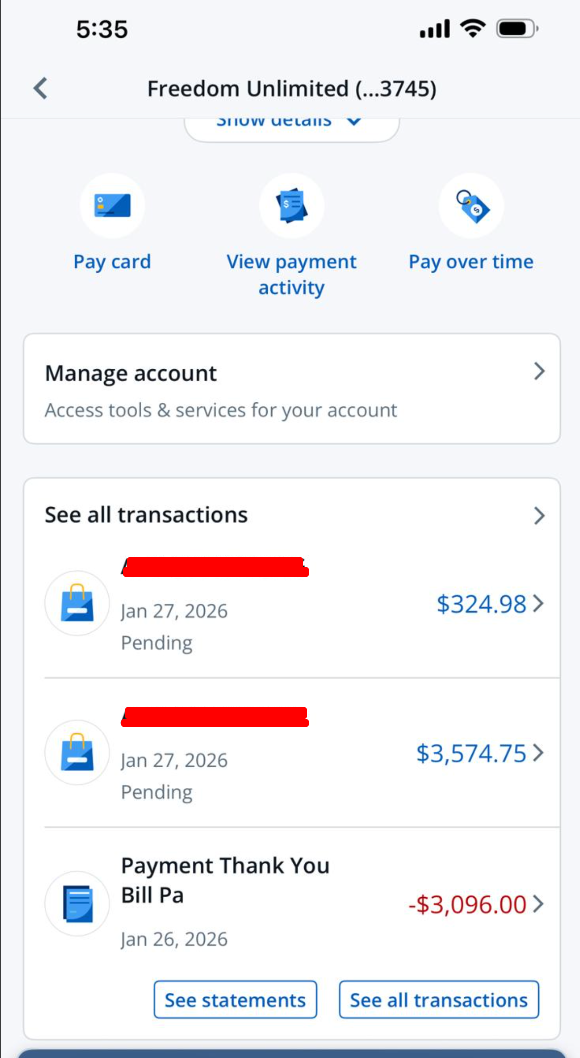
> | **Authorization** | A temporary hold on the **remaining balance**, it's a verification, **not a charge**. It ensures the plan can continue without interruption. |
{" "}
An authorization is **not** a real charge. It is released within **4–28 days**
depending on the issuing bank. However, some banks label it as
*"****pending****"* in statements, which confuses customers **and even bank
staff**. If a customer or their bank flags this, explain that it's a standard
temporary hold and will drop off automatically{" "}
### 5. Will the customer need enough credit for the full amount?
> **Yes, at setup only.** The customer must have available credit equal to the full purchase price when first creating the plan. After that, they're only charged the installment amount each month.
***
## Credit & Card Support
### 1. Will using xPay Installments affect the customer's credit score?
> **No.** No credit check is performed.
### 2. Which credit cards are supported?
> Depends on the merchant plan, but typically:
>
> * ✅ **Visa**
> * ✅ **Mastercard**
> * ✅ **American Express**
> * ✅ **Discover**
> * ✅ **UnionPay**
>
> Supported cards are clearly shown at checkout.
### 3. Can customers pay with a debit card?
> **No.** Only credit cards are accepted at this time.
***
## Fees
### 1. Why is there a convenience fee on card installments?
> The convenience fee (typically 6–9%) covers:
>
> * **Payment processing** & card network costs across multiple transactions.
> * **Authorization management** over the life of the plan.
> * **Risk coverage** - xPay guarantees the merchant gets paid even if the customer defaults later.
>
> **How to position it:** *"It's a small fee for the flexibility of paying over time and unlike a personal loan, there's no interest, no credit check, and no new account."*
***
## Payment Failures & Retries
### 1. What happens if a customer's installment payment fails?
> 1. The customer receives a notification to update their card or ensure sufficient funds.
> 2. If it continues to fail, the remaining balance may be captured from the authorization.
### 2. How many times can I ask the customer to retry?
> **2–3 attempts maximum.** Beyond that, it creates a poor experience and increases failure. If the payment still fails after 3 attempts:
>
> * Reach out to understand the issue (expired card, insufficient funds, bank block).
> * Offer to update the card on file.
> * If unresolved, escalate to xPay support.
Do **not** retry more than **3 times**. Excessive retries can trigger fraud flags at the issuing bank and damage the merchant's processing reputation.
***
## Common Customer Quesiotns & How to Handle Them?
### 1. "I see a large pending charge on my card!"
> **Response:** *"That's an authorization hold, not a charge. Your bank is confirming your card can support the plan. It will drop off within a few days. You'll only be charged your monthly installment amount."*
>
>  ### 2. "My bank says I was charged the full amount!"
> **Response:** *"Some banks display authorizations as pending charges but no money has left your account beyond the installment. If needed, we can provide a transaction breakdown you can share with your bank."*
### 3. "I don't want a credit check."
> **Response:** *"There is no credit check at all. xPay uses your existing credit card and no new applications, no hard pulls, no bureau reporting."*
### 4. "Why can't I use my debit card?"
> **Response:** *"xPay works by placing a temporary authorization on a credit line, which debit cards don't support. We're limited to credit cards for now."*
### 2. "My bank says I was charged the full amount!"
> **Response:** *"Some banks display authorizations as pending charges but no money has left your account beyond the installment. If needed, we can provide a transaction breakdown you can share with your bank."*
### 3. "I don't want a credit check."
> **Response:** *"There is no credit check at all. xPay uses your existing credit card and no new applications, no hard pulls, no bureau reporting."*
### 4. "Why can't I use my debit card?"
> **Response:** *"xPay works by placing a temporary authorization on a credit line, which debit cards don't support. We're limited to credit cards for now."*